Posts from 2020

Some more ~/.emacs.d evolution

4 min read

When I started with this version of the blog on Hashnode1, my plan was to try and write something at least once a week. I managed to do that as far as January this year, give or take, but then things got a little busy, the world got trickier, and... Well, you don't need me to tell you about that. Anyway, I'm back to write some more and, hopefully, try and keep up with writing. I feel it'll do me good.

I have been busy since January. Work has, as far as possible, carried on as normal. The only big difference being I'm back working from home. It's an odd turn of events personally given that I'd worked from home for 21 years, then (with some trepidation) went back to working in an office. Having got used to being in an office and being around people, it took some adjusting to working alone again.

So, on to the main point of this post... During that period I've spent a lot more time at my machine than I would normally, and so it was inevitable that I'd end up tinkering with my Emacs configuration. While it's true that there's hardly a week goes by where I don't tinker with some small thing, I try not to make huge changes too often. Huge changes do happen though.

A handful of weeks back was another one of those times where I made a big change.

After I burnt my original ~/.emacs file back in 2016 I've had an approach where I've tried to make things as modular as possible, and as easy to clone down to a new machine as possible. The design I came up with, especially once I moved over to using use-package, has served me well. But there was always one thing that bothered me: the files that handled the loading and configuration of packages were, in effect, still three large monolithic files. While this was better than a single monolithic ~/.emacs, it still didn't feel quite right.

Giving it a bit of thought, I decided that what I really wanted was a single directory in which I could drop lots of small .el files that would handle the loading and configuration of all sorts of packages. While it didn't gain anything concrete, the idea felt tidier. Tidy is good. Feeling like the code smell is good, is good too.

First though I needed a way to load multiple files, ideally within a whole directory hierarchy, without needing to know in advance what files would be there. After a little bit of tinkering I settled on this bit of code that revolves around the use of directory-files-recursively:

(let ((source (expand-file-name "init.d/packages.d/" user-emacs-directory)))
  (when (file-exists-p source)
    (cl-loop for use in (directory-files-recursively source (rx ".el" eol))
             do (load (file-name-sans-extension use)))))

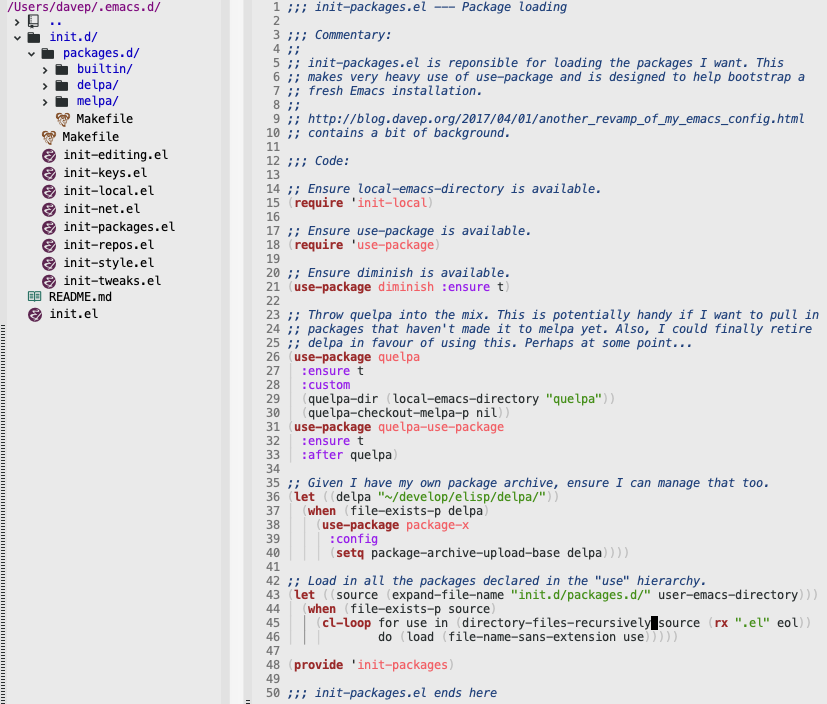
Simply put, this code finds every file in and below ~/.emacs.d/init.d/packages.d/ whose name ends in .el (note the use of a regular expression, using rx to create it), removes the extension from the name, and loads it with load (dropping the extension means load can decide if it wants to load the compiled version of the code, or the source, depending on what's available).

After writing that I could then start to populate ~/.emacs.d/init.d/packages.d/ with lots of smaller files that handled the loading of packages. In some cases there's a file just for one package, in other cases there's a file that handles a logical grouping of packages (where there are obvious direct dependencies, or where one package is designed to extend the other, etc). For now I've decided to break things down into three directories that map to the three monolithic files I had before:
Screenshot 2020-06-07 at 16.36.28.png

However, I'm not totally wedded to this design and I may change this as time goes on.

While I've not spent any time properly testing it out, I've also not really noticed any obvious impact on startup speed. However, this tends not to be a real concern for me. I seldom start Emacs anyway. I always have it running and use emacsclient as my editor in most places so files open instantly in the running version of Emacs.


  1. Note from future me: we're now back over on blog.davep.org of course. 

dnote.el - A wrapper for the dnote CLI

3 min read

Late on last year I stumbled on an article about dnote. Annoyingly, I can't recall now where I saw it, but I made a reminder to look at it over my Christmas break.

Dnote looked like a tool that would fill a hole I had in how I work. When it comes to making notes about things, and keeping things for future reference, I use a few tools, each one being just right (for me) for the job in question. I use Evernote to track documents and other household type things. I use Keep to make notes about stuff I need to remember short-term (say, the size of a space in my bedroom that I want furniture to go in) and also to record notes while in meetings at work. I use Journey to keep a journal about... anything, really. Finally, I use Pinboard to keep hold of URLs I might want to go back to (I also use it to create a to-read list).

Amongst all of this, however, I felt I was missing something for keeping track of things that don't really fall into any of the categories above. Mostly this would be work-based or hacking-based things that are short and sweet but I don't always use enough to easily remember. I wanted just the right tool that would let me ferret away useful one-liners, remind myself of obscure switches that get used once or twice a year, etc.

After reading up on dnote it seemed pretty clear that this was just such a tool.

After getting back to the office at the start of this month I decided to make use of it and see how it went. My idea was simple: I'd record any "TIL" stuff that I might want to remember in the future, as well as recording things I need now and again but can't always remember.

So far it's working quite well. I like that it has a simple CLI. I like that it's got a backend that you can use to sync between different machines. I like that it's got a web interface that's mobile-friendly. I like that it's Free Software and so you can host your own server if you wish.

I found I liked it enough that, of course, I felt the need to start a simple Emacs wrapper for the CLI.

At the moment dnote.el is designed to be a simple capture system. There are commands for capturing a one-liner (entered in the Emacs mini-buffer), for capturing the content of the current buffer, and for capturing freshly-entered multi-line text, entered in a buffer that uses markdown-mode. There's also a command for syncing notes if you have configured dnote to talk to a backend.

What I don't have right now is the ability to navigate and view notes. So far I've not really felt the need for that because the CLI approach works so well. Longer-term though I can see my tweaking this and adding in commands for searching, viewing, editing and deleting notes.

But, for now, if you've not had a look at dnote, I'd highly recommend having a play and seeing if it makes sense for you. And, if it does, and you're an Emacs user, perhaps dnote.el will be useful too?

Where I live and work

2 min read

It's no surprise that I spend a lot of time in Emacs. Especially when I'm developing software, either for work or for personal fun, most of my time is time spent in Emacs. While I do obviously flit over to Chrome, and mostly do my CLI stuff in iTerm2 (I really like eshell but it just can't replace a good terminal for me), I spend a lot of time looking at Emacs.

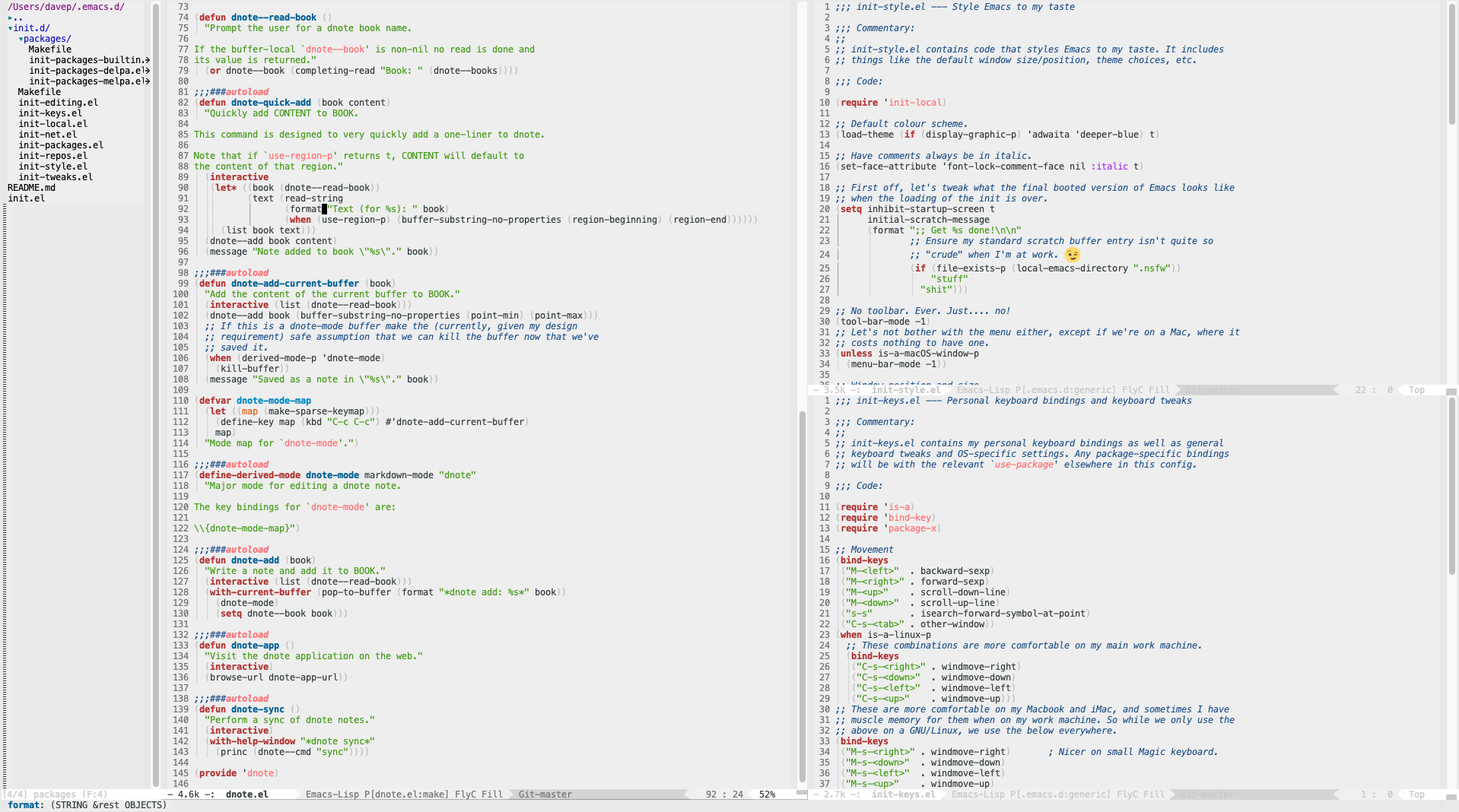
Here's what my Emacs looks like:

Screenshot 2020-01-11 at 13.49.04.png

Key elements for me are as follows:

Light background

Something I've never really got on with when it comes to code editing is dark themes and dark backgrounds. I find it too much of an eye strain. Oddly, I tend to prefer dark themes everywhere else, but not when it comes to working in Emacs. The theme I use is the built-in adwaita theme.

Less boring mode line

I make use of powerline to make the mode line a bit less boring-looking. While the colour scheme is such that it's kept in line with the light look, the style is nice in that it sort of matches the style of prompt I use in my shell.

Screenshot 2020-01-11 at 14.05.39.png

Full screen

I always run Emacs as a full-screen application, then splitting it into different tiled windows using its own internal window handling. This is something I've done from way back when I got started with my first GNU/Linux desktop machine, and still like to do on macOS.

I also run Emacs as a server and then use a little wrapper around emacsclient to open files (both locally and remotely) from the command line in that Emacs session.

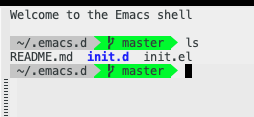
Comfortable eshell when I need it

Although I say above that I generally don't use eshell, preferring to use a full-featured terminal application, in combination with fish, I do sometimes dip into eshell for quick things. So of course I have that configured to feel comfortable too.

Screenshot 2020-01-11 at 14.10.07.png

I do this easily thanks to eshell-git-prompt.