Posts from November 2019

EmacsConf 2019 videos are out

1 min read

At the start of this month I spent a very enjoyable Saturday afternoon watching EmacsConf 2019. If you missed it, or even if you didn't, you might like to know that the announcement has gone out that almost all of the videos are now available for watching.

While I mean nothing negative about any other video, I think the two that stand out the most for me, in terms of things that grabbed my interest, were How a Completely Blind Manager/Dev Uses Emacs Every Day and Emacs as my Go To Script Language.

I seem to recall that both those talks were hit with technical issues (many talks on the day were -- part of the enjoyment for me was how the whole conference was an experiment in using Free Software to host the whole thing), but they're well worth a watch despite this.

If you have any sort of interest in Emacs I'd highly recommend dipping into the whole collection.

I really hope there's going to be a 2020 EmacsConf.

Visual evolution of ~/.emacs.d

2 min read

As detailed in a blog post I wrote back in 2016, I first got into using Emacs in the mid 1990s, starting with it on OS/2 and then moving over to GNU/Linux. It's been my often-used and much-loved development environment for most of those years (I even have a couple of packages that are part of Emacs itself).

For most of that time my configuration was a single ~/.emacs file, which was around 1,000 lines in length (including comments and whitespace). It'd grown over the years, having special configuration sections for versions of Emacs I didn't use any more, and operating systems I didn't work on any more (yes, really, there were things in there specific to MS-DOS, for example). On top of that I always hand-installed packages I used -- Emacs' package management system having turned up long after I first got into using Emacs.

Then, in early 2016, I decided to nuke the whole thing and start from scratch. As mentioned above, the start of this is detailed in an older post. Another big round of changes happened round a year later -- which included the birth of delpa to manage my personal packages. A couple or so months later there was one last big round of changes, mostly killing off my enthusiastic embracing of customize and instead going back to hand-set settings, only this time done via use-package.

The full history of this can be found over on GitHub, starting with the first "throw everything away and start again" process and all the steps between then and where my Emacs configuration is now.

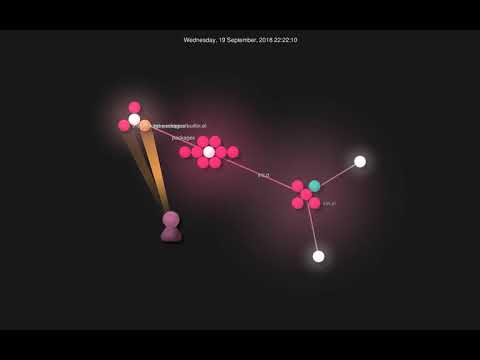
Which brings me to the fun part of this blog post. Earlier this week I stumbled on Gource. It's a tool that's primarily designed to visualise changes in repositories, although it can be used to visualise anything that has a tree structure and changes over time (this week I produced a video of the growth of my employer's electronic lab notebook by hooking up the Benchling API with Gource, for example). So I got curious. What did it look like as I reworked and tweaked and changed and tinkered with my Emacs configuration?

This is what it looked like:

Visit YouTube

Getting started

1 min read

By coincidence, in a couple of different places over the last couple of weeks, the subject of "how do I progress in leaning to program?" has cropped up. For me, I think the approaches and solutions tend to be the same for when I want to get my head around a new language: read good examples of idiomatic code, read other related materials, find a problem you care about and implement a solution (ideally something you'll directly benefit from, or at least others may benefit from). Hence the 5x5 puzzle and Norton Guide reader projects I mentioned in my previous post.

Of course, not everyone has problems that they need solving in a way that would work for this approach. So another approach I've recommended in the past is to go looking on somewhere like GitHub and find projects that promote "low-hanging fruit" issues in a way that's designed to be friendly for those who are new to development, new to contributing or new to the problem domain.

While looking for examples of this yesterday I stumbled on Awesome for Beginners. This looks like a great list and one I'm going to keep bookmarked for future reference. Now, this particular list does seem to have an emphasis on pulling in people who are new to contributing to a project rather than new to development, but it does strike me as a good place to start looking no matter where you're coming from.

I know I'm going to start having a wander around that list. It's always nice to contribute and I feel there's real personal benefit in actively solving a problem that someone else has and welcomes help with.

Going on a journey

3 min read

It's hardly a revelation to say that learning a new programming language, or even learning software development at all, is even more difficult if you don't have an actual problem to solve. I know I'm not alone in having pet projects that, when faced with a new environment, I'll code up a version of that project as a way to get familiar with and understand a language's idioms while implementing something I know well.

Personally, my two favourites are a puzzle called 5x5 (here, here, here, here, here, here and here), and writing a library or even a full application to read Norton Guide database files (here, here, here, here, here, here, here and here). Both are fun to work on, have practical uses, and both have the benefit of being solved problems (for me) that let me concentrate on the "how do I do X in this language/toolkit/environment/framework/etc?".

Even with those two as my goto projects, I'm always open to new small problems that might be fun to apply to languages I do know, or languages I want to get to know (internally at work we have a fun "league" of sorts, writing a particular hamming distance calculation tool in different languages, for example).

A few days ago, via this repo on GitHub, I discovered this fun little problem. Right away I could see the benefit in it. As a "go away and code up a solution" interview question it strikes me as near-perfect. It's obviously not hard to solve, but it touches on some basic but important aspects of software development and so will allow the developer to show off how they approach things.

There's so many different approaches to it too. Even in a single language, I could imagine having some fun writing the smallest code to solve the problem, the most idiomatic code to solve the problem, the most supportable and well-documented code to solve the problem, etc. And then there's the thing I talk about above: knowing the solution and knowing it's easy, you can then use it to learn the idiomatic way of solving the problem in new languages.

Even better, the README of the original repo links to solutions others have written. Knowing the problem, and knowing the solution, you can then go and read other people's code and learn something about different styles and different languages.

Over the next few weeks, as I get free time, I think I might just do this. Take the "Journeys" problem and write versions in different languages I work with, or know, and also use it to get to know languages I've yet to know or use heavily (I'm especially keen to try a version in Julia -- a language I really like the look of and want to find a reason to use).

Meanwhile, yesterday, I had a quick go at a first version in Python (aimed at Python 3.8 or higher): https://github.com/davep/journeys.py

I set out to try and write something that was fairly idiomatic Python, which uses tools that I tend to employ when working on Python projects (pipenv, make, etc), and which also used something I've never quite found a need for so far in my usual coding, but which I can see being useful and helpful.

I even threw in a couple of uses of PEP 572!

I can see me tinkering with this some more over the next few days. I can even see me writing a very different implementation in Python, just for the fun of it.

I think that's what I like about this little problem. It's a good way to do a bit of programming exercise; it's like the perfect way to do the programming equivalent of going for a short run.

My Pylint shame

3 min read

I first got into Python in the mid-to-late 1990s. It's so far back that I think the copy of Programming Python that I have (sadly in storage at the moment) might be a first edition. I probably fell out of the habit of using Python some time in the early 2000s (that was when I met Ruby). It was only 22 months ago that I started using Python a lot thanks to a change of employer.

As you might imagine, much had changed in the 15+ years since I'd last written a line of Python in anger. So, early on, I made a point of making Pylint part of my development process. All my projects have a make lint make target. All of my projects lint the code when I push to master in the company GitLab instance. These days I even use flycheck to keep me honest as I write my code; mostly gone are the days where I don't know of problems until I do a make lint.

Leaning on Pylint in the early days of my new position made for a great Python refresher for me. Now, I still lean on it to make sure I don't make daft mistakes.

But...

Pylint and I don't always agree. And that's fine. For example, I really can't stand Pylint's approach to whitespace, and that is a hill I'll happily die on. Ditto the obsession with lines being no more than 80 characters wide (120 should be fine thanks). As such any project's .pylintrc has, as a bare minimum, this:

[FORMAT]
max-line-length=120

[MESSAGES CONTROL]
disable=bad-whitespace

Beyond that though, aside from one or two extras that pertain to particular projects, I'm happy with what Pylint complains about.

There are exceptions though. There are times, simply due to the nature of the code involved, that Pylint's insistence on code purity isn't going to work. That's where I use its inline block disabling feature. It's handy and helps keep things clean (I won't deploy code that doesn't pass 10/10), but there is always this nagging doubt: if I've disabled a warning in the code, am I ever going to come back and revisit it?

To help me think about coming back to such disables now and again, I thought it might be interesting to write a tool that'll show which warnings I disable most. It resulted in this fish abbr:

abbr -g pylintshame "rg --no-messages \"pylint:disable=\" | awk 'BEGIN{FS=\"disable=\";}{print \$2}' | tr \",\" \"\n\" | sort | uniq -c | sort -hr"

The idea here being that it produces a "Pylint hall of shame", something like this:

  12 wildcard-import
  12 unused-wildcard-import
   8 no-member
   6 invalid-name
   5 no-self-use
   4 import-outside-toplevel
   4 bare-except
   2 unused-argument
   2 too-many-public-methods
   2 too-many-instance-attributes
   2 not-callable
   2 broad-except
   1 wrong-import-position
   1 wrong-import-order
   1 unused-variable
   1 unexpected-keyword-arg
   1 too-many-locals
   1 arguments-differ

To break the pipeline down:

rg --no-messages "pylint:disable="

First off, I use ripgrep (if you don't, you might want to have a good look at it -- I find it amazingly handy) to find everywhere in the code in and below the current directory (the --no-messages switch just stops any file I/O errors that might result from permission issues -- they're not interesting here) that contains a line that has a Pylint block disable (if you tend to format yours differently, you'll need to tweak the regular expression, of course).

I then pipe it through awk:

awk 'BEGIN{FS="disable=";}{print $2}'

so I can lazily extract everything after the disable=.

Next up, because it's a possible list of things that can be disabled, I use tr:

tr "," "\n"

to turn any comma-separated list into multiple lines.

Having got to this point, I sort the list, uniq the result, while prepending a count (-c), and then sort the result again, in reverse and sorting the numbers based on how a human would read the result (-hr).

sort | uniq -c | sort -hr

It's short, sweet and hacky, but does the job quite nicely. From now on, any time I get curious about which disables I'm leaning on too much, I can use this to take stock.
EmacsConf 2019

1 min read

For anyone who doesn't know, today is the day for EmacsConf 2019. As you might gather from the name, it's a conference all about Emacs, the joys of Emacs, Emacs Lisp and other Emacs-related things.

Better still, it's an online conference (although there do appear to be a couple of related physical gatherings around the world).

I've got snacks and drinks in and no plans for my Saturday, and I hope to follow the whole thing from start to finish.

If Emacs is your thing, or knowing more about Emacs is your thing, be sure to check it out!