Posts from December 2019

nuke-buffers.el -- Tidy up open buffers in Emacs

2 min read

Both at work and at home I use Emacs by keeping a copy running all the time, and use emacsclient to open files inside it (including on remote machines thanks to a bit of ssh and heavy use of tramp -- I might write this up at some point). This works really well, but does mean I tend to build up a lot of buffers over time.

Having lots of buffers open isn't generally an issue, and if I'm working on lots of different files in a project during the course of a hacking session it's actually a good thing. But, quite often, I want to tidy up the buffer list, clearing it back to near-zero buffers open. Many years ago, when I had a "proper" tower system running 24/7, with Emacs open all the time, I'd use clean-buffer-list as part of midnight. Along the way that fell out of favour with me, likely because I drifted into using machines that had Emacs open all the time but where the machine wasn't awake all the time.

Eventually I decided to have some fun rolling my own solution, and nuke-buffers was born.

Rather than try and do things in an automated way, this was designed to be bound to a key (or two) and then be run when I wanted, being as harsh as possible about cleaning up the buffer list. Since first writing it it's worked well for me.

These days I tend to let the buffer list build up as I work on a new feature, or chase down a bug, etc. Then, once I've made the final commit for that period of focus, I'll hit the nuke-buffer key combo as the final act of confirming that I've done the job. So not only does this help tidy my Emacs session a bit, it also feels like a physical form of punctuation -- back in less sensible days, when I had some terrible habits, it would have been when I'd reach for the celebratory cigarette; buffer-tidying feels far more wholesome. ;)

The way the code works is, of course, mostly directed at how I work -- it's highly likely it wouldn't make sense for many other people. The main aim is to kill as many buffers as possible, but without disturbing anything else. The list of buffers it gathers for nuking avoids buffers that are visiting files but have unsaved content, avoids the minibuffer (obviously), avoids any "special" buffer (one that starts with a space then an asterisk), avoids the current buffer and also avoids any buffer in a list of names to avoid.

I've being using this on a daily basis for around 2.5 years now and it's done the job without ever losing me any work.
git2gantt -- Simple tool to visualise coding runs

3 min read

At the start of this year, as part of a much bigger process to review the work that had taken place over the previous 12 months, I was asked (at work) to provide some information about how much time I'd spent on various projects. Now, for me, there's really only one project, but there's lots of different tools and libraries that I've written to support the main work I do. All of these are split into different repositories in the company-internal instance of GitLab. This meant that getting a rough idea of what I was working on and when would be easy enough -- it's all there in the commit history.

Given that this information would make up a couple of slides at most during a far bigger presentation, I wanted something that would be snappy and easy for non-developers to follow and understand. I spent a bit of time pondering some options and decided that (ab)using a gantt chart layout would make sense.

That choice was made all the more easier given that GitLab supports the use of mermaid charts within its Markdown. This meant I could quickly write some code that took the git log of each repository, turned it into mermaid code, and then render it (by hand, this was all about getting things done quickly) via GitLab.

This sounded like it could be a fun personal project. The result was some Python code called git2gantt.

As mentioned above, the output isn't anything too clever, it's just code that can be used to create a plot via mermaid. For example, running git2gannt over itself:

gantt
  title git2gantt output
  dateFormat YYYY-MM-DD

  section git2gantt
  Development: devgit2gantt20190208, 2019-02-08, 2019-02-13
  Development: devgit2gantt20190214, 2019-02-14, 2019-02-15
  Development: devgit2gantt20190303, 2019-03-03, 2019-03-04
  Development: devgit2gantt20191203, 2019-12-03, 2019-12-04

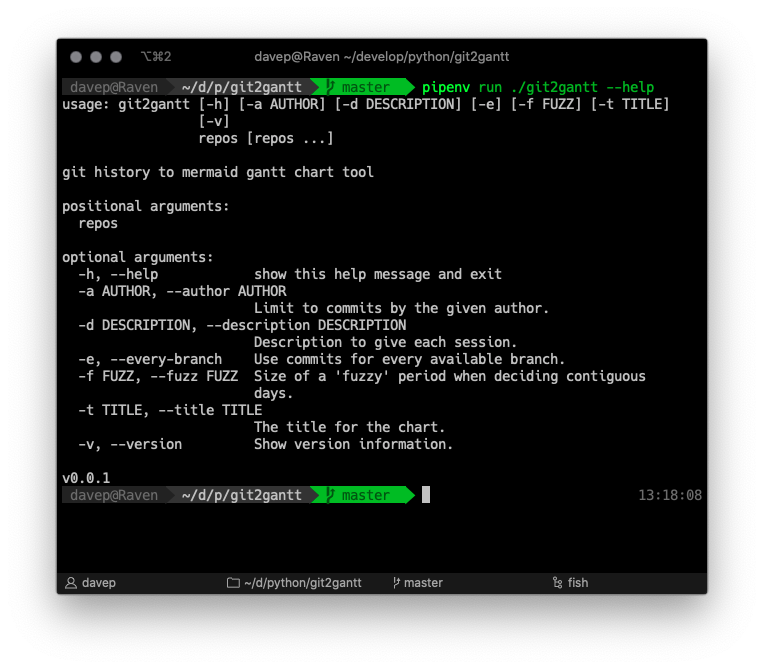
Usage is pretty straightforward: Screenshot 2019-12-08 at
13.18.12.png As you can see, it can be run over multiple repos at once, and there's also an option to have it consider every branch within each repository. Another handy option is the ability to limit the output to just one author -- perhaps you just want to document what you've done on a repo, not the contributions of other people.
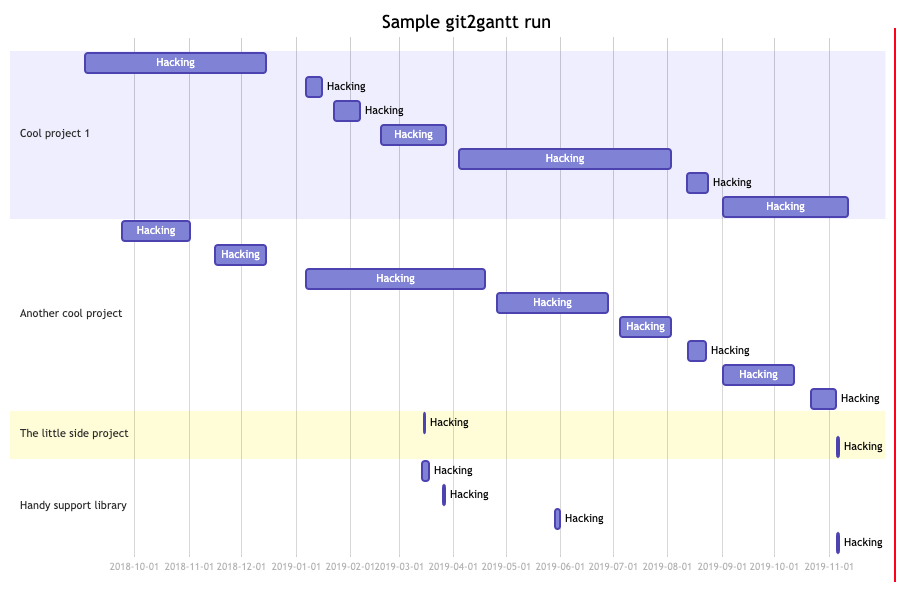
Also especially handy, if you don't want to bore people with too much detail, is the "fuzz" option. This lets you tell git2gannt how relaxed you want it to be when it tries to decide how long a run of work on a repo lasted. So, perhaps, you're working on and off on a library that supports some other system you're documenting, but you might only be making changes every other day or so. With the correct fuzz value you can make it clear you were working on the library for a couple of weeks, despite there only being a commit every other day.

An example of running the output over a handful of projects would look something like this:

Screenshot 2019-12-08 at 13.34.41.png

This is one of those tools I knocked up quickly to get a job done, and haven't quite got round to finishing off fully. One thing I'd really like to do is add mermaid support directly within it, so that it actually has the option to emit plots, not just mermaid code (or, perhaps, drop the mermaid approach and use something else entirely).

Meanwhile though, if you're looking for something quick and dirty that will help you visualise what you've been working on and when for a good period of time... perhaps this will help.

Being phony, and Lispy regular expressions

2 min read

While it does seem that they're a little out of fashion these days, in some circles anyway, I'm still an avid fan of make and make files. Even in environments where I don't need a Makefile to actually build anything, I'll use one (or more) to help create handy shortcuts for getting stuff done.

Looking at the main Makefile for one of my major work projects, there's 45 targets that help fire off various jobs (all of them self-documenting using a variation on an approach I read a while back).

In most cases the targets aren't real targets. That's to say, they don't build the thing they're called. They are phony targets. So, as makes sense, I make a point of marking them all as such. I follow the convention that has the .PHONY marker appear on the line before the target; this feels cleaner to me and easier to follow and maintain.

But.... I'm lazy. And I use Emacs. Typing out .PHONY foo all the time feels like far too much work. So, some time ago, I quickly threw together make-phony.el.

With this I could be really lazy. I could type out the Makefile target and then, with my cursor on it, press a key combination and have the .PHONY marker put in place.

Does it save much time? Yeah, probably not really. But it was a fun little exercise and an excuse to write a little bit of Emacs Lisp.

There's one thing I made a point of doing in the heart of this too: using rx. For anyone who doesn't know of it, think of it as a very Lispy way of writing regular expressions. I won't even try and explain it all here because others have done an excellent job already. What I will do is say this: if you're in the habit of writing some Emacs Lisp, or even tinkering with your configuration, and you find yourself writing a regular expression, consider looking at rx -- it's well worth the time to get to know it.

Slowly, as time goes on, I'm weeding out "vanilla" regular expressions from my config and code and moving over to using rx. I feel, quite rightly I think, that something like this:

(rx
 (or
  ;; Ignore hidden files.
  (group bol ".")
  ;; I never want to edit the desktop.
  (group "Desktop/" eol)
  ;; Ignore compiled files.
  (group "." (or "pyc" "elc") eol)
  (group ".egg-info/" eol)))

is much easier to write, read and maintain, than this:

"\\(^\\.\\)\\|\\(Desktop/$\\)\\|\\(\\.\\(?:\\(?:\\(?:el\\|py\\)c\\)\\)$\\)\\|\\(\\.egg-info/$\\)"

I mean, even if the regular expression above can be written in a more efficient way (and I imagine it can), as someone working in a Lisp environment, I'd much sooner write and work with the rx version.