Posts from November 2015

My first proper BT broadband outage

5 min read

Until I moved about a year ago I'd always used Demon Internet as my ISP. I stated with them during the old tenner-a-month days when there were only a handful of points-of-presence to be called. I stuck with them through them getting full local POP coverage, through having an ISDN line and then finally ADSL.

When I moved though I decided it might be easier to just go with BT; for the most part this hasn't actually been a bad decision. This week though I suffered my first proper outage with them and it was rather frustrating.

It kicked off at around 2015-11-16 21:00. I noticed that Google Drive (in Chrome) was complaining that it was offline. I then noticed that gmail and a couple of other tabs in Chrome were complaining about the same thing. I did a couple of local network checks and found nothing, checked the router and it was connected and reporting just fine, so then I rebooted the router and things appeared to improve.

For a short while anyway. Then I started to notice other problems; mostly that some sites would time out, others not. Initially I was getting a lot of DNS timeouts and, while I normally use Google's DNS servers (BT's have long had lots of problems1), I tried switching back to BT's own and that appeared to improve matters. For a while anyway.

I mentioned the issues on twitter and got a handful of replies from different people running into similar issues. It was clear that this wasn't just me. I then went looking for BT's broadband status page but hilariously was unable to load it because of the problem.

This is my first bit of real frustration with them. Here's how the page looks inside a desktop browser:
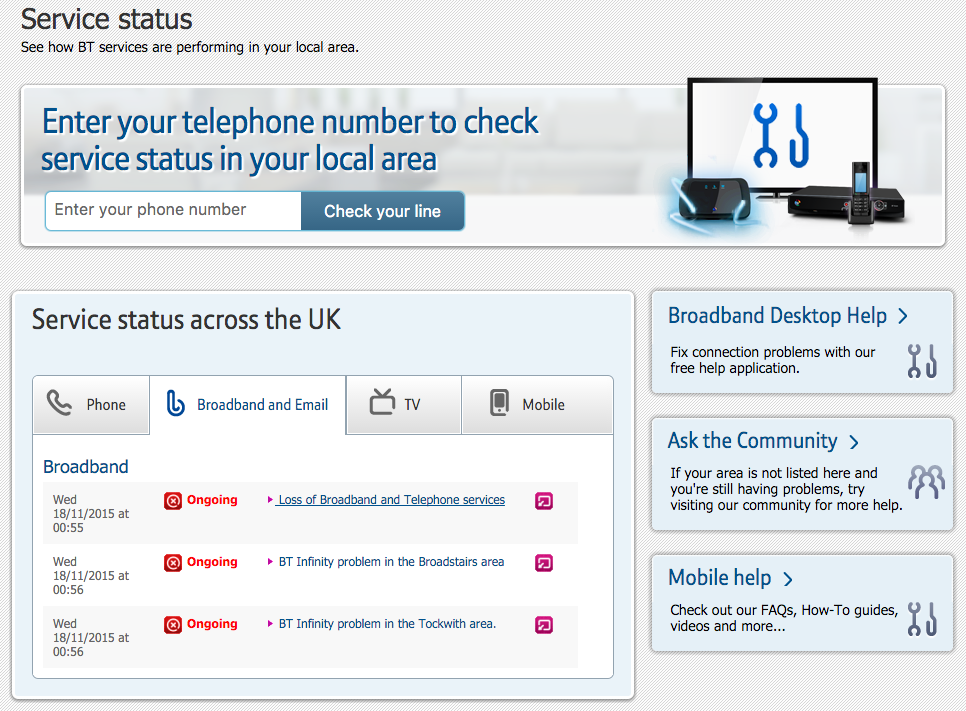
Status in desktop browser

Now compare it as seen inside Android Chrome on my Nexus 6:
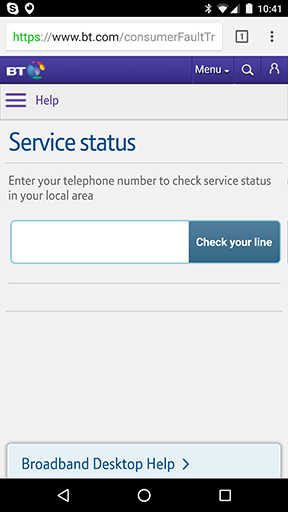
Status on my phone

Apparently they have decided that I'd never want to be able to check why my broadband might be down, from a mobile device. Yes, sure, there's the option to put my phone number in -- perhaps it tells me after I've done that -- but I don't even know my land line number; I don't use it as a phone most of the time and so never bother remembering it. The main point here is why the hell wouldn't they include the same useful information as the desktop view? Or perhaps use geolocation of the phone to narrow things down if they feel the need.

Anyway, I gave up and went to bed. In the morning things were no better but, after another router reboot, I did manage to get a view of the status:
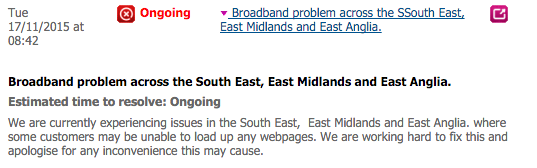
Finally got to see broadband status

Finally! Acknowledgement of the problem. Worryingly though it was dated almost 12 hours after I first noticed the problem. From what I can see that date and time isn't the date and time the status was last updated, it's the date and time it was first added. That suggest that they really hadn't noticed the problem all night. It's not like it was a problem that was hard to notice, at least from a customer's point of view. Check this graph from a down detector site:
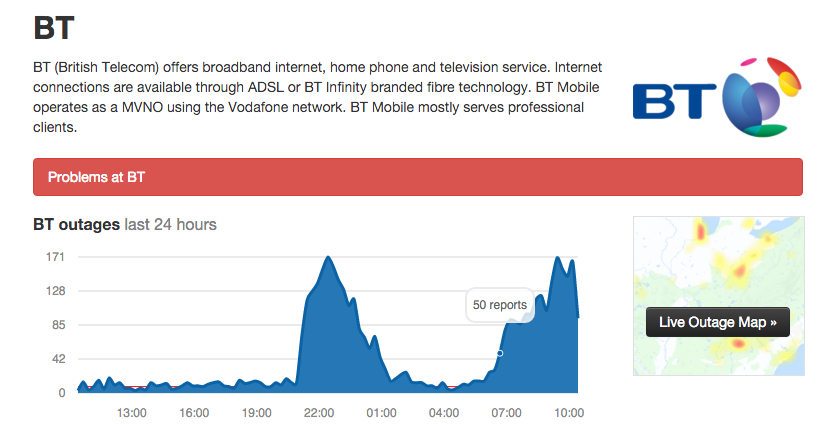
It really was down

You'd think that a company as big as BT would have something in place that could catch network problems, especially ones that are able to be caught with a simple crowdsourcing "press this button if you have a problem" approach.

But... nope. Appears not. O_o

Anyway, a couple or so hours later the problem was finally fixed:
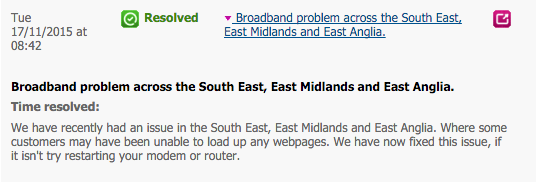
Finally got to see broadband status

(Notice how the date and time is the same as earlier; so 100% not an update time but a first-added time) I mentioned this on twitter:

and I even got a reply (which I'd not gone looking for, so that was nice):

Curious as to why it'd take almost 12 hours from the problem appearing to it being acknowledged on their status, I thought I'd ask:

which got this reply:

which doesn't really make a whole lot of sense. Sure, you to spend time identifying the source of a problem to fix it, but you don't need to do that to notice and acknowledge that there's a problem. I've asked again but haven't received any sort of reply as of the time of writing (I'm not expecting one really).

What I take from all of this is that BT are shockingly bad at keeping people informed of problems with their service when there's a large outage. I find that kind of annoying. I don't mind that there are problems, I do mind when a company can't take the time to clearly and quickly state "yup, it's us, it's not you, we're looking into it..."


  1. Don't even get me started on how the HH5 won't allow setting of DNS servers in the hub itself. That's stupid and frustrating beyond words. 

A little bit of usenet

2 min read

Earlier on today I needed a copy of wget on my iMac. It's not "native" to it so I got to wondering how you go about getting something like that onto it. Sure, I could have just grabbed the source and built myself, but really it's a lot nicer to use some sort of package manager.

A quick search lead me to Homebrew and I was then up and running in no time.

This in turn got me to thinking about how it might be fun to get some of the software I used to use on my GNU/Linux machine up and running again. The first one that came to mind was slrn. Sure enough slrn is available via Homebrew and installing it was dead simple.

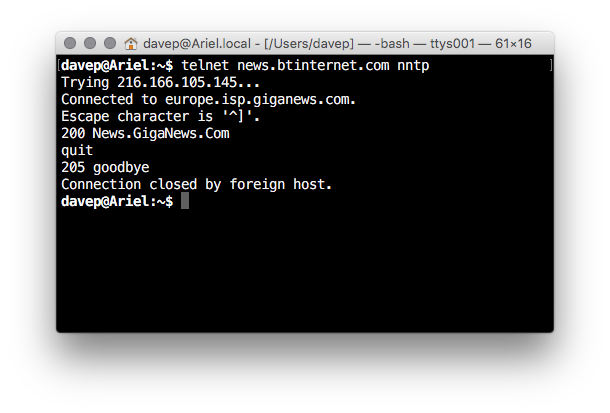
But then I was faced with a problem: I needed an NNTP server. Way back I used to run a local one in my office that fed from and to my ISP's. Back then my ISP was Demon Internet; these days I'm with BT. A quick search lead me to an article or two that BT had a NNTP server, of sorts, provided by a third party. So I did a quick check:

Is the server there?

Yay! This looked good.

After that I fired up slrn and.... problems. It kept asking me to log in, to provide a user name and password. The only problem was that I'd read in more than one place that a user name and password weren't needed for BT's server; all that was required was you be on a BT IP address. Checking the slrn docs I found force_authentication but ensuring that was off made no difference.

At this point I removed slrn and gave up.

Later, thinking it might be an issue with just slrn and perhaps it was worth trying a native NNTP client, I grabbed Unison (which is no longer supported but seems to work fine). I got that set up and ran into the same issue: it wanted login details.

Finally, after a bit more digging, I stumbled on the reason why I was struggling to make any of this work: BT had closed support for the server back in December last year!

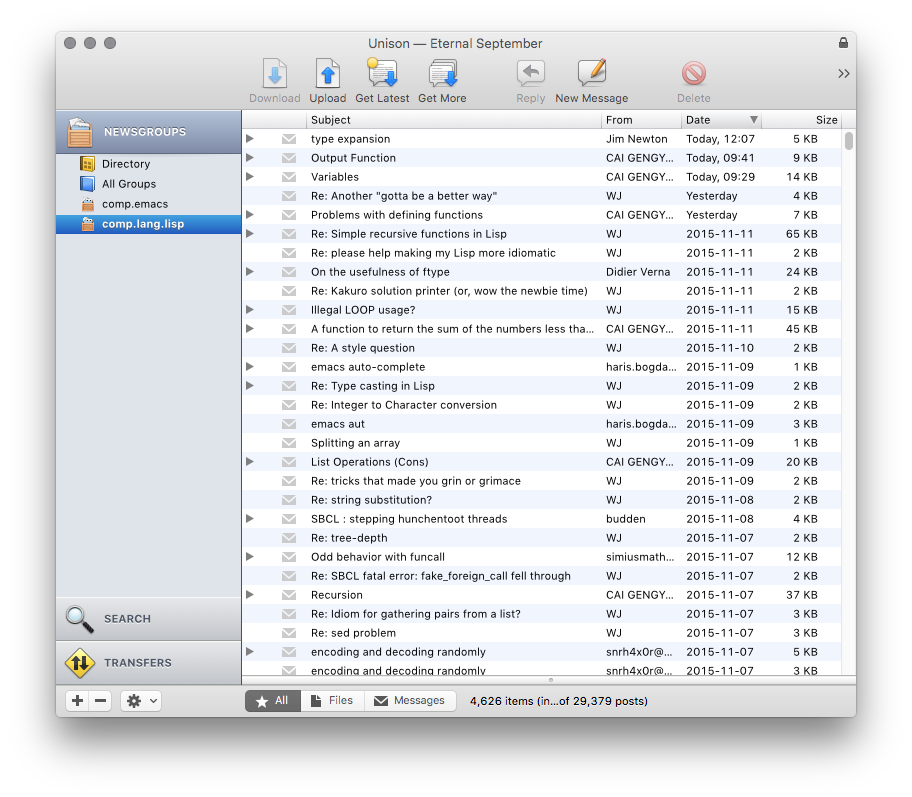
A quick search around the web and I stumbled on Eternal September. Given all I was interested in was the good old text groups this looked perfect. I quickly registered an account, ran up Unison again and plugged in my details and....

Is the server there?

Now that's all sorted I should try again with slrn. At which point I'll need to drag out and tidy up post.el (the version that was being maintained by some other people seems to have gone very stale, sadly).

I miss "Until next alarm"

2 min read

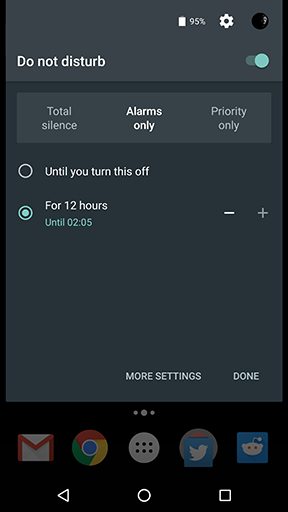
I actually can't remember when the change was now, it was either Android 5.0 or one of the 5.x point releases, but I can recall the frustration of Google having changed how you make an Android device silent, or not. The idea seemed clever enough but it was a real pain to switch to and use. Previously there'd simply been this neat system of setting he volume to either be some non-off value, vibrate or totally silent. I even had a neat little widget on the home screen of my phone to allow me to toggle between these 3 states.

It was simple, and worked well.

The new system though.... ugh. It was confusing and so much more long-winded to work with.

At some point though they added one big redeeming feature: "Until next alarm". When I got into bed I could tell my tablet to go totally silent until my alarm went off in the morning, and then it would all work as normal. That was an utterly brilliant idea.

So it made sense that if they changed anything about this in Marshmallow they'd keep that in and make it even more awesome, right? Right?!?

Nope

Well fuck!

Why? Just..... why?!? I actually prefer how the new one works. They've more or less solved the problem of how it was more faff to deal with, they've solved the problem of having to cock about with the volume rocker to get at the settings and then set the settings. I like all that.

But taking "Until next alarm" away? That's just nuts.

Sometimes I really get the impression that the Android developers are like the Chrome OS developers: they're having a ton of fun improving and onward developing the system but they have little connection to how people actually use this stuff.

Voice search failing on Nexus 6

1 min read

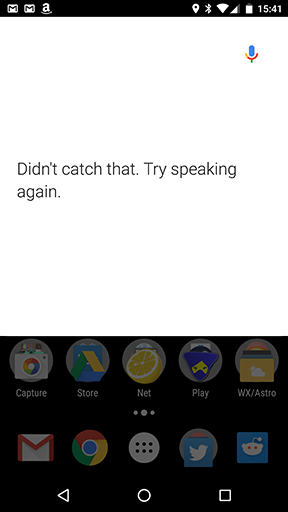
It's been quite a while since I used voiced search on my Nexus 6. Ever since I got the Moto 360 I've not really had a need to say "OK Google" to my phone because I could simply say it to my wrist. Today though, because I wanted to quickly look something up and my phone was to hand, I spoke to it and got this:

Voice search fail

Brilliant.

I've been here before. I had exactly this sort of problem with my Xperia Z at one point. The problem appeared to go away eventually (actually, it sort of came and went a few times over a matter of weeks, if I recall correctly), although I never really got to the bottom of the cause.

I've tried rebooting the phone and that hasn't helped at all. While it's more of a vague annoyance than anything else (like I say above, my Android Wear device is my goto tool for talking to Google these days) it does frustrate a little when fairly expensive tools don't "just work".

Usenet spam, still a thing

1 min read

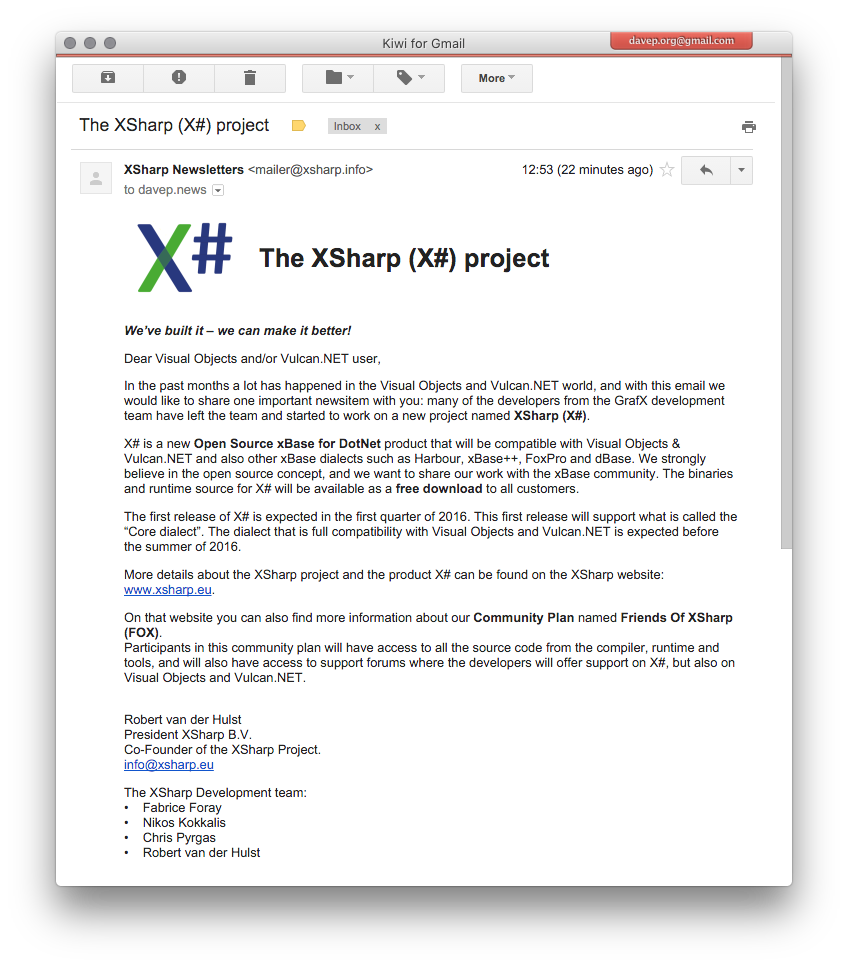
This just turned up in email a little earlier:

Yay! Spam!

What's of particular interest is the email address this was sent to. It was one that I only ever (to my knowledge) used for posts to Usenet. While my gmail spam folder is filled with emails to that and other addresses I used for Usenet over the years this is the first bit of "proper" spam I've had to it in a long time.

It's signficant that it's some sort of Xbase-related thing too. I think the Usenet group I posted to more than any other will have been comp.lang.clipper. Unless I had some lapse of judgement at some point in the late 1990s or early 2000s (I think I only got the davep.org domain in 1999, now I think about it) the address this was sent to was used nowhere else.

I've also never been a "Visual Objects and/or Vulcan.NET user". While I did once own a copy of Visual Objects (two copies actually -- a beta and then a final release) it wasn't in a way that I'd have been on some mailing list and even if I had the address in question wouldn't have been the one used.

So, yeah, great way to impress me with a new product: make your first contact with me look exactly like some old Usenet spam.

Edit to add: I've since had it confrimed by the sender of the email that my address was indeed pulled from comp.lang.clipper.

How to kill OS X's HelpViewer

1 min read

A little earlier today I decided it was time that I read up a little more about the abilities of OS X's Spotlight facility. I use it a little -- it's a handy tool to get at some often-used applications that I don't really need laying around in the dock -- but I was starting to wonder if I could get more out of it.

The obvious first place to look was in the HelpViewer; all the information I'm ever going to need will be on the local machine, right?

So I open the HelpViewer, from the Spotlight bar, and type in that I want information about Spotlight. The page comes up blank. The page was pretty small so, while I pondered why it might be blank, I resized it and it disappeared! I tried to open it again and.... nothing. Nothing I did would make the HelpViewer show again.

I then tried following the advice on this page but none of that appeared to help. I then looked for the HelpViewer in the Activity Monitor and killed it with that.

Running it again after that got me back to where I started. I tried the while process again and, sure enough, trying to resize the window made it disappear. I can make it happen every single time:

So it looks like another fine example of the Apple "it just works" thing. For "doesn't always just work" values of "just works".